
PIXINSIGHT SCRIPTS
Blink Quality Selector
Version 1.0.0 · updated 7 September 2026 · PixInsight 1.9.4 or later
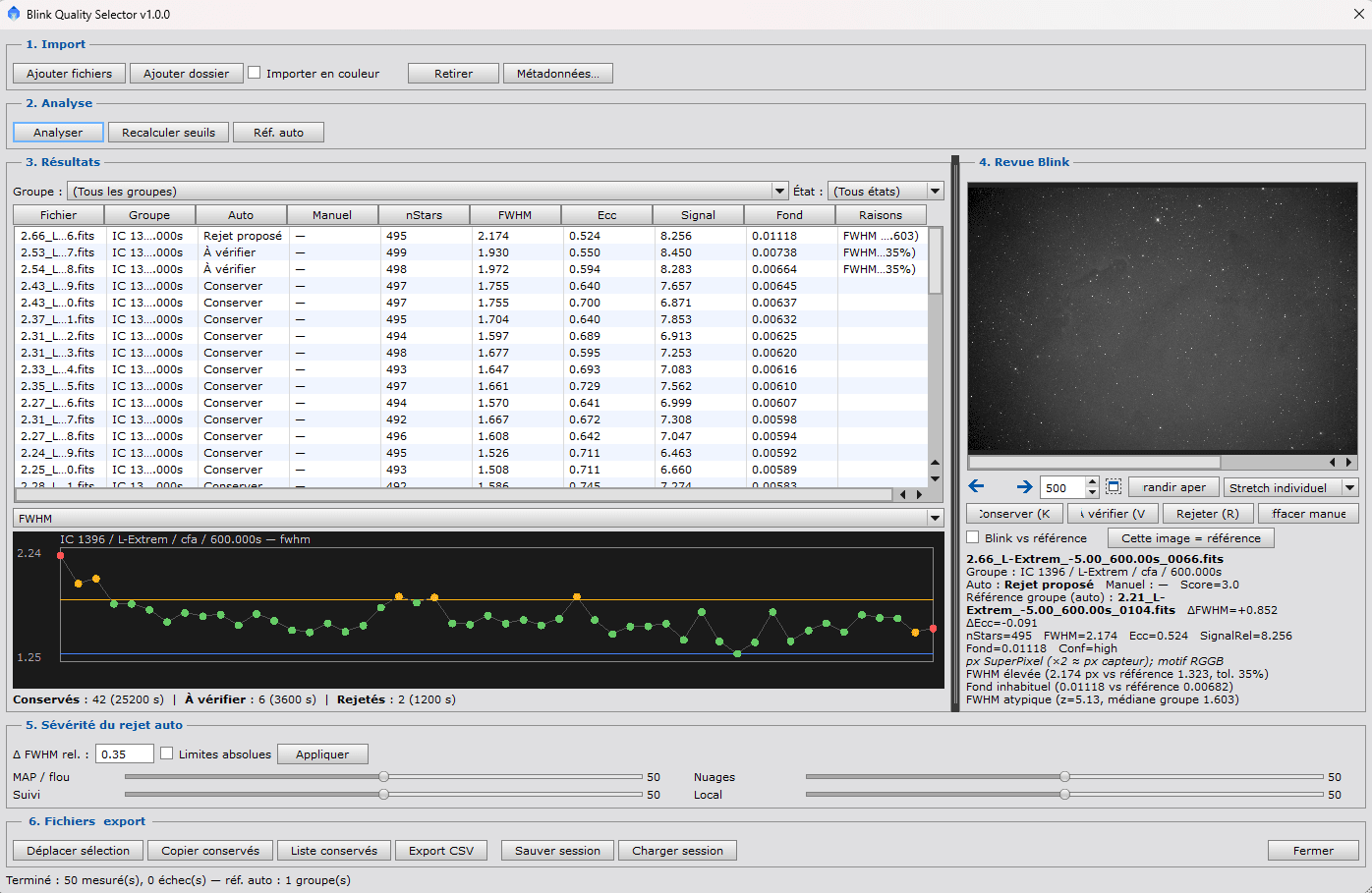
A PJSR script to rank raw light frames before WBPP: relative star analysis, Blink-style review, manual decisions, then export. Original files are never modified — measurements run on in-memory copies.
What it does
- Flag degraded frames (blur, tracking, haze, and similar) on mono, CFA, or already-debayered RGB sets.
- Automatic proposals (keep / review / reject) with manual decisions that are kept.
- CSV export, keep list, copy of kept files, JSON session.
Requirements
- PixInsight 1.9.4 or newer (native StarDetector and PSF classes).
- An Internet connection while you add the repository and download the update.
Install from the repository (recommended)
In PixInsight, add the URL below. The trailing slash is required. PixInsight rejects redirects: use this exact address, with no shortcut and not astropoulpe.fr (without www).
https://www.astropoulpe.fr/pixinsight/- Resources → Updates → Manage Repositories.
- Add, paste the URL, then confirm twice (OK).
- Resources → Updates → Check for Updates.
- Apply, then quit PixInsight. Accept the install when prompted.
- After restart: Script → Astro Poulpe → Blink Quality Selector.
This repository is not signed with an official CPD identity. PixInsight may show a warning; that is expected. Confirm the URL is Astro Poulpe’s before continuing.
Manual install
Download the archive, unzip it, then in PixInsight: Script → Feature Scripts… → Add. Select the BlinkQualitySelector folder (the one that contains BlinkQualitySelector.js), not a parent folder.
Then: Script → Astro Poulpe → Blink Quality Selector.
How to use it
- Import — files or a folder. Default: RAW CFA. Fix metadata if it is missing.
- Analysis — star measurements and a proposed reference frame.
- Results — sortable table and plots.
- Blink review — step through frames, compare to the reference, decide with the keyboard (K keep, V review, R reject).
- Severity — adjust sliders per defect type, then apply.
- Export — CSV, copy kept files, move the selection, session.
Limits
- Originals are never overwritten. Moving files to a folder (e.g. Rejects) asks for confirmation.
- No automatic satellite / airplane trail detection: mark those by eye in Blink review.
- On CFA, FWHM is in SuperPixel units — comparable within the same group, not against a mono group.
- This is not a replacement for SubframeSelector after calibration / WBPP.